Project 4: A Puzzle Wrapped in an Enigma, Shrouded in Mystery
Due by: Friday, April 24, 2020 by 11:59 p.m.
If you can remember all the way back to Lab 6, we introduced the 15-puzzle, a common puzzle with 15 numbered (or otherwise ordered) tiles placed on a 4 × 4 grid, with a single empty tile. The user can move any neighboring tile to the empty location, making the previous location of the moved tile empty. The object of the puzzle is to eventually move all of the tiles around until they are numbered in ascending order, with the first tile in the upper left and the last tile empty. Below is an example of a Java GUI showing an unsolved puzzle.
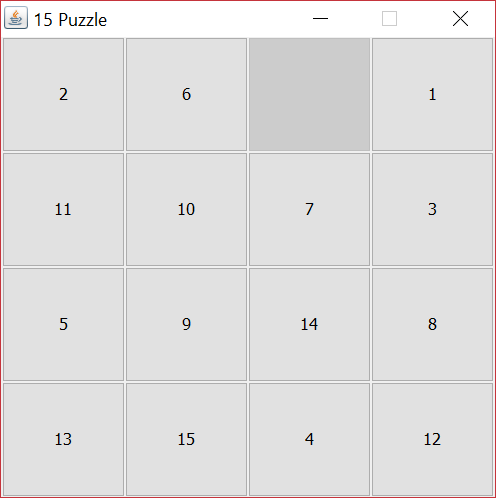
Lab 6 prompted you to create a Swing-based Java GUI for a 15-puzzle, but what if we wanted a program that could solve such a puzzle? It turns out that some puzzles can't be solved, and there is an algorithm that can quickly tell whether a puzzle can or can't be solved.
But what if the puzzle can be solved? How would we solve that problem? The approach we will take is a search algorithm. In this and earlier courses, we have discussed searching through lists or arrays, but this search will look through the space of possible puzzle moves. When you search through a list, all the elements of the list are present. However, the space of all possible puzzle moves is very large, so we will only search through the part of the space, prioritizing moves that look like they're getting us closer to a solution.
Specification
Create a project called Project4, add a package to it called puzzle, and add the following files to that package. Note that Javadoc information is available here.
Both the NumberButton and Puzzle classes have been completed for you. Your only job is to fill in the methods in the Solver and State classes and write JUnit tests in the StateTests class.
State Class
Objects of the State class can hold a snapshot of a Puzzle state. At its heart, objects of this class hold a 2D array of int values corresponding to the button positions in a Puzzle. The only exception is that the empty tile is stored as n2 (16 for a 15-puzzle) instead of as zero. We need this state information for several reasons. First, we will move from State to State, visiting State representations that having lower estimated solution costs, until we (hopefully) reach a State with a cost of zero, meaning that all the tiles are all in the right places. Second, when doing so, we'll keep a set of all of the State representations we've visited, so that we never try a State more than once. Finally, each state will keep a reference to its previous State and the move made from it, allowing us to reconstruct the sequence of moves that reaches a solution.
We're taking things one step at a time here. The State class doesn't actually solve a Puzzle, but it allows us to represent and compare various states the Puzzle might be in, making it easier to solve. A few of the methods are completed for you, but you'll need to complete the following methods in State yourself.
State(int[][] state, Puzzle.Direction move, State previous, int blankRow, int blankColumn)
Constructor called to create a newStateobject. It sets all of the member variables to the input variables. And it also calls thecost()method and stores the result in thecostmember.State getPrevious()
Accessor to retrieve previous state.Puzzle.Direction getMove()
Accessor to retrieve move that led to the current state.boolean canMove(Puzzle.Direction direction)
Method called to determine if moving in a given direction is legal. The direction has a row change and a column change. If the row change added to the row of the blank tile is still a legal row and the column change added to the column of the blank tile is still a legal column, the move is legal; otherwise, the move is not.State move(Puzzle.Direction direction)
Method called to create a newStateobject, resulting from moving the blank tile in the direction specified bydirection. First, create a new 2D array and copy all of the values fromstateinto it. Next, find the row and the column specified bydirectionthat the blank tile will move to. Then, swap the value in the new array at the current location of the blank tile with the location given by the row and column you just found. Finally, return a newStateobject built from this 2D array, the specified direction, the current state, and the new row and column for the blank tile.static int cost(int[][] state)
Static method called to estimate the number of moves needed to solve a state. For each tile (except the blank tile), find the row where it should be (by dividing one less than its value by the width of the puzzle) and the column where it should be (by modding one less than its value by the width of the puzzle). Find the absolute value of the difference between the row where it is and the row where it should be and the absolute value of the difference of the column where it is and the column where it should be and add these values to the total cost. Return this total cost.
As an example, the cost of the puzzle shown in the picture at the top of the project description has a total cost of 22. You can find this value by summing up all the row and column costs.boolean isSolved()
Method called to check whether the state is in a solved position. For any tile, if the row times the width of the puzzle plus the column plus one is ever not equal to its tile value, it's not solved. In that case, returnfalse. Once all of the tiles have been checked and none of them violate this rule, the puzzle must be solved, and you can returntrue.
| 2 Goal: 1 Row cost: 0 Column cost: 1 |
6 Goal: 2 Row cost: 1 Column cost: 0 |
Goal: 3 | 1 Goal: 4 Row cost: 0 Column cost: 3 |
| 11 Goal: 5 Row cost: 1 Column cost: 2 |
10 Goal: 6 Row cost: 1 Column cost: 0 |
7 Goal: 7 Row cost: 0 Column cost: 0 |
3 Goal: 8 Row cost: 1 Column cost: 1 |
| 5 Goal: 9 Row cost: 1 Column cost: 0 |
9 Goal: 10 Row cost: 0 Column cost: 1 |
14 Goal: 11 Row cost: 1 Column cost: 1 |
8 Goal: 12 Row cost: 1 Column cost: 0 |
| 13 Goal: 13 Row cost: 0 Column cost: 0 |
15 Goal: 14 Row cost: 0 Column cost: 1 |
4 Goal: 15 Row cost: 3 Column cost: 1 |
12 Row cost: 1 Column cost: 0 |
Solver Class
Now that much of the heavy lifting has been done by the State class, we only need to write a few methods to complete the Solve class. The constructor that sets everything up has been written for you.
int[][] initializeState(NumberButton[][] buttons)
Static method used to create a 2D array ofintvalues corresponding to the values inbuttons. First, create a 2D array the same size asbuttons. Then, loop through all of theNumberButtonobjects inbuttonsand set the corresponding value in theintarray to the number from eachNumberButton, with one exception: The blank button has number 0 but should be assigned the dimension (width) of the puzzle squared, so that it has the last number.State solve(State startingState)
Static method that actually finds a solution from a givenState. This method explores states in a methodical way, always picking states that haven't been visited and that appear closer to the solution. The method takes the following steps.- Create a
PriorityQueueofStateobjects and addstartingStateto it.. APriorityQueuelets you store objects ordered by value. In this case, the order is from lowest costStateto highest cost. - Create a
Set(HashSetis recommended) of visitedStateobjects. ThisSetrecords the states we've already visited so that we don't try to visit them twice. - As long as the
PriorityQueueisn't empty: - Remove a
Statefrom thePriorityQueue - If this
Statehasn't already been visited: - Add the
Stateto theSetof visited states - If the
Stateis solved, return it: It's the answer! - If the
Statecan move left, add theStatethat you would get by moving left to thePriorityQueue - If the
Statecan move right, add theStatethat you would get by moving right to thePriorityQueue - If the
Statecan move up, add theStatethat you would get by moving up to thePriorityQueue - If the
Statecan move down, add theStatethat you would get by moving down to thePriorityQueue - If you run out of things in the
PriorityQueue, it was impossible to find a solution, so returnnull
Testing
In previous projects, you did not yet know about JUnit tests. Now that you do, we need to write some to test this project. JUnit tests are ideal for unit tests, small tests of the functionality of individual classes and methods. Although professional programmers could (and should) write tests for Solver, you are only required to write the following five tests inside the StateTests class. Note that these tests all test aspects of a State object or the 2D array that represents the data inside of such an object. It's possible to write tests that work on a full 4 × 4 grid, such as we would have for a 15-puzzle. However, it's reasonable to write tests that work on a State that holds only a 2 × 2 or a 3 × 3 grid, since it will be much less work to set up the data.
void canMoveSucceedTest()
Test that constructs an appropriateStateobject and checks to see if moving in a legal direction is allowed (as it should be).void canMoveFailTest()
Test that constructs an appropriateStateobject and checks to see if moving in an illegal direction isn't allowed (as it shouldn't be).void costTest()
Test that constructs a 2D array ofintvalues that represents the data inside of aStateobject and checks if the cost estimate is correct. Note that you will have to compute what the cost estimate should be on your own.void isSolvedSucceedTest()
Test that constructs aStateobject that is in the solved state (with all the tiles where they go, including the empty tile at the end) and checks to see if it is solved (as it should be).void isSolvedFailTest()
Test that constructs aStateobject that is not in the solved state (with at least one tile not in its final position) and checks to see if it is not solved.
Turn In
Your Eclipse project should be called Project4, but the classes you should turn in are Solver, State, and StateTests, all in the package puzzle. Zip up the Solver.java, State.java, and StateTests files from the Project4\src\puzzle folder inside your workspace folder and upload the resulting zip file to Blackboard. Only the team leader should turn in this file. There is no need to include NumberButton.java or Puzzle.java.
All work must be submitted before Friday, April 24, 2020 by 11:59 p.m. unless you are going to use a grace day.
All work must be done within assigned teams. You may discuss general concepts with your classmates, but it is never acceptable for you to look at another team's code. Please refer to the course policies if you have any questions about academic integrity. If you have trouble with the assignment, I am always available for assistance.
Grading
Your grade will be determined by the following categories:
| Category | Weight |
|---|---|
State methods |
|
State constructor |
5% |
getPrevious() method |
5% |
getMove() method |
5% |
canMove() method |
5% |
move() method |
10% |
cost() method |
10% |
isSolved() method |
5% |
Solver methods |
|
solve() method |
20% |
initializeState() method |
5% |
StateTests methods |
|
canMoveSucceedTest() test |
5% |
canMoveFailTest() test |
5% |
costTest() test |
5% |
isSolvedSucceedTest() test |
5% |
isSolvedFailTest() test |
5% |
| Style and comments | 5% |
Code that does not compile will automatically score zero points.
Under no circumstances should any member of one group look at the code written by another group. Tools will be used to detect code similarity automatically.